Canon Pixma G3270
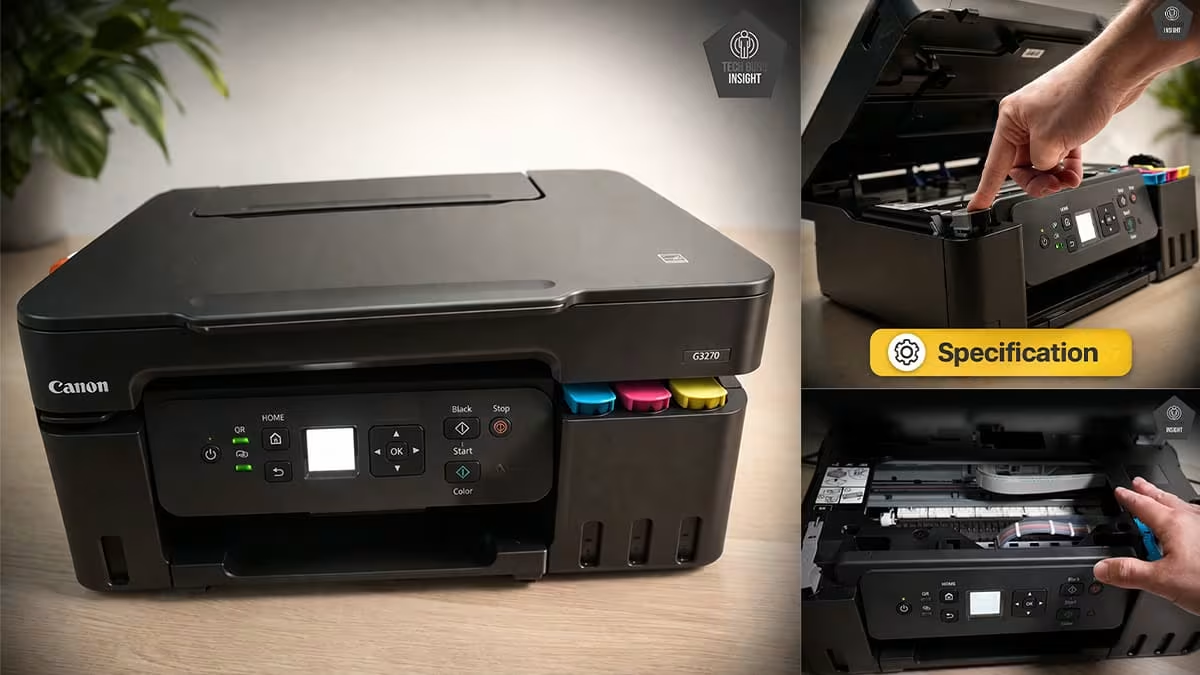
Type: All-In-One Technology: Inkjet SuperTank: Yes Color: Yes Wireless: Yes
Recommended in: AirPrint Printers Under $200
Variants
The remaining models in this printer lineup are simply region-specific or color variations, offering the same specifications and performance. You can find them listed in the table below.
Canon G3270, White
Canon G3270, Black
Canon G3290, White, Touch LCD, ADF
Usage
The Canon PIXMA G3270 is a great option for family use because it offers extremely low printing costs and a high page yield. It is reliable for printing homework, school projects, and everyday documents. Wireless connectivity also allows family members to print easily from smartphones, tablets, or laptops.
The Canon PIXMA G3270 is a reasonable option for small office use, thanks to its low printing cost and reliable document quality. It works well for everyday reports and paperwork. However, slower print speeds and the lack of an automatic document feeder make it less suitable for heavy office workloads.
The Canon PIXMA G3270 is an excellent printer for students because it offers very low printing costs and a high page yield, allowing thousands of pages before needing ink refills. It produces sharp text for assignments and notes, while wireless printing makes it easy to print directly from laptops, tablets, or smartphones.
The Canon PIXMA G3270 performs very well for black-and-white printing. It uses pigment black ink that produces dark, crisp, and highly readable text on plain paper. Documents look sharp with clear details, making it ideal for reports, homework, and everyday documents, although the printing speed is slightly slower.
The Canon PIXMA G3270 delivers good color printing for everyday documents, charts, and school projects. Colors appear bright with clear details, making presentations and graphics look attractive. However, color accuracy is not perfect, so it is better suited for casual printing rather than professional photo work.
Performance
The Canon PIXMA G3270 produces excellent text quality thanks to its pigment black ink system. Characters appear dark, sharp, and well-defined, even in small fonts. This makes documents easy to read and professional looking. It is especially reliable for reports, assignments, and everyday paperwork printed on plain paper.
The Canon PIXMA G3270 delivers good color quality for everyday printing. Colors appear bright and clear in charts, presentations, and graphics, while fine details remain visible. However, color accuracy is slightly limited, so it works best for casual documents and photos rather than professional design or high-end photo printing.
- Scanner: Flatbed (CIS sensor)
- ADF Capacity: N/A
- Duplex Scanning: No
- Max Scan Size: 216 × 297 mm (equivalent to A4 size)
- Scan Speed: Black (Mono): ~28 seconds per page (200 ppi)
- Scan Speed: Black (Color): ~33 seconds per page (200 ppi)
- Flatbed Hinge Adjustability: Basic (limited flexibility for thick books)
- Max Scan Resolution: 1200 × 1200 DPI
- Optical Scan Resolution: 600 × 1200 dpi
- Max Scan Color Depth: 24Bit
| Feature | Details |
|---|---|
| Copy | ✅ Supported |
| Copy Resolution | Up to 600 dpi |
| Copy Speed | 12 Sec. (black), ~27 Sec. (color) |
| Maximum Copies | Up to 99 copies |
| Reduce / Enlarge | 25% – 400% |
| Fax | ❌ Not supported |
The Canon PIXMA G3270 offers decent scanner quality for everyday use. It produces clear scans of documents and photos, making it suitable for homework, records, and basic office tasks. However, the lack of an automatic document feeder and moderate scan speed limit its efficiency for heavy scanning workloads.
- Black Only Text Document: 9 PPM
- Color Printing: 3 PPM
- First Page Out Time Black: 17 s
- First Page Out Time For Colour: 19 s
- Duplex Printing: Manual
- Input Tray Capacity: 100 pages
The Canon PIXMA G3270 offers moderate printing speed suitable for home and student use. Black text prints at a reasonable pace, while color documents take noticeably longer. It performs reliably for everyday tasks such as homework and reports, but slower speeds make it less ideal for large printing jobs.
- Black Cartridge Price: $17.99
- Color Cartridge Price: $38.97
- Black-Only Printing Cost: $0.003 per page (0.3 cents)
- Color Printing Cost: $0.006 per page (0.6 cents)
- Draft Black Printing Cost: $0.002 per page
- Draft Colour Printing Cost: $0.004 per page
The printer offers exceptionally low printing costs thanks to its MegaTank refillable ink system. Each ink bottle prints thousands of pages, making it far cheaper than cartridge printers. It is ideal for students, home users, and small offices that print frequently while keeping long-term operating expenses extremely low.
Design
The Canon PIXMA G3270 offers solid build quality for a budget ink-tank printer. Its body is made from dense plastic that feels sturdy during everyday use. The scanner lid closes smoothly with a dampening mechanism, though some hinges feel slightly inexpensive. Overall, it feels reliable for home printing but not premium.
– Standard Dimensions (W × D × H):
416 × 337 × 177 mm
– Maximum Dimensions (with trays extended):
416 × 557 × 268 mm
– In Inches:
— Standard: 16.4 × 13.3 × 7.0 inches
— Max (expanded): 16.4 × 21.9 × 10.6 inches
– Weight:~6.0 kg (~13.2 lbs)
Display Screen: Monochrome LCD
Display Type: Icon-based LCD display
Display Size: 1.35-inch screen
Touchscreen: ❌ No
Control Type: Physical buttons with indicator icons
The Canon PIXMA G3270 features a small 1.35-inch monochrome LCD display designed for basic status information and simple navigation. It works adequately for checking printer settings and alerts, but the screen is not very bright and has limited viewing angles, making it harder to read unless viewed directly.
- SuperTank: Yes
- Photo Cartridge: NoDedicated cartridges for photo printing.
- Colour: Yes
- Number Of Color Cartridges: 3
- Black Cartridge Model: Canon GI‑21 PGBK
- Tested Black Page Yield: 5,900The number of black ink prints covering 80% of the paper’s total surface.
- Estimated Black Page Yield: 6000 PrintsThe approximate total number of document pages printable using a single black ink cartridge.
- Color Cartridge Model: Canon GI‑21 Cyan, Magenta, Yellow
- Tested Color Page Yield: 3,400–6,800 PrintsThe number of cyan, magenta, and yellow ink prints covering 80% of the paper’s total surface.
- Estimated Color Page Yield: 7700 PrintsThe approximate total number of color document pages printable from one complete set of color cartridges.
- Ink Type: Pigment black + dye-based color inkWhether the printer uses Toner, Dye or Pigment ink.
- High Yield Cartridge: YesLarger-capacity official cartridges are available for this printer.
The Canon PIXMA G3270 uses a MegaTank refillable ink system instead of traditional cartridges. This system allows thousands of pages to be printed before needing a refill. The ink bottles are easy to use and help reduce printing costs significantly, making the printer ideal for frequent home and office printing.
- Ink Related Maintenance: Expected
- Drum Unit: No
The Canon PIXMA G3270 requires typical inkjet maintenance but remains manageable for home users. It includes built-in maintenance routines such as nozzle checks, printhead cleaning, alignment, and roller cleaning to maintain print quality. Ink tank refilling is simple, though occasional cleaning may be needed if the printer stays unused.
- Print Technology: Inkjet
The Canon PIXMA G3270 has a moderate risk of printhead clogging because it uses liquid ink like most inkjet printers. If the printer remains unused for long periods, the ink can dry and block the nozzles. Printing regularly and running occasional cleaning cycles helps maintain consistent performance.
Mobile App and Connectivity
- Ethernet: ❌ No Ethernet port
- USB Input To Computer: ✅ 1 × Hi-Speed USB 2.0
- Wireless: ✅ Yes
- Bluetooth: ❌ No
- Wi-Fi via Router: ✅ Yes (Wi-Fi 802.11 b/g/n, 2.4 GHz)
- Wi-Fi Direct: ✅ Yes
- External Storage Support: ❌ No USB flash drive printing
- Apple AirPrint: Yes
- Mopria Print Service: Yes
The Canon PIXMA G3270 offers reliable connectivity for everyday home printing. It supports Wi-Fi, Wi-Fi Direct, and USB connections, allowing easy printing from computers, smartphones, and tablets. Mobile printing options such as AirPrint and Mopria work smoothly, though the printer does not include Ethernet or Bluetooth connectivity.
- Mobile App: Yes
- App Name: Canon PRINT Inkjet/SELPHY
- iOS: Yes
- Android: Yes
| File Type | Android | iOS |
|---|---|---|
| Photo (JPEG, PNG) | ✅ Yes | ✅ Yes |
| ✅ Yes | ✅ Yes | |
| Microsoft Office Files (DOC, DOCX, XLS, XLSX, PPT, PPTX) | ❌ No (usually requires conversion to PDF) | ✅ Yes |
| Text Files (TXT) | ❌ No | ✅ Yes |
| Webpages (HTML / Saved Webpages) | ❌ No | ✅ Yes |
Where To Buy
You help support Tech Guru Insight’s product testing and reviews by purchasing from our retail partners.